
The picture Many introductory diagrams show
Open any "how the internet works" article. You'll see this picture:
"Your browser asks a DNS server for the IP address. The DNS server responds. The browser connects."
It's a useful starting point. The parts it leaves out are the parts that explain CDNs, "DNS propagation delays", and why your laptop's network settings have a "DNS server" field at all.
In practice, resolution involves your browser's memory, your operating system's cache, your router, your ISP's recursive resolver, one of 13 root servers, a TLD server, and finally an authoritative server - typically four to six different machines, often on three different continents, all involved in resolving one question: "what's the IP for google.com?"
Often, the full lookup never happens because the answer is already cached locally or at the resolver.
This post walks through the entire chain - what each player does, why the design looks weird, and what tools like dig reveal about the conversation.
1. Why DNS Exists at All
Computers route packets using IP addresses - 32-bit numbers like 142.250.183.78. Humans remember names like google.com. DNS is the translation layer between the two.
That much is obvious. The interesting part is why the translation needs four servers instead of one.
The answer is scale. There are around 350 million registered domain names. No single machine could answer queries for all of them, store all the records, and absorb the global query load. So DNS is structured as a distributed hierarchical database, where different organisations own different slices of the namespace and are responsible only for their own.
Every DNS lookup is a tour through that hierarchy.
2. The Hierarchy
Domain names read right to left in increasing specificity:
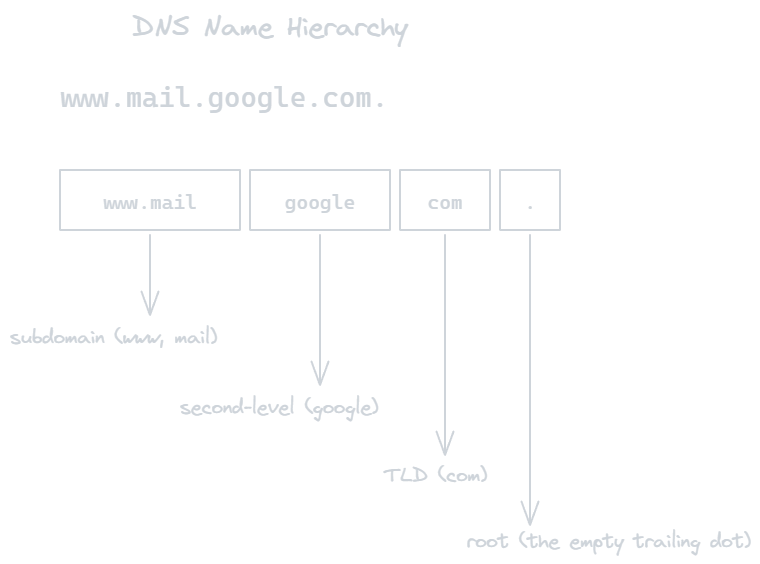
The trailing dot (the root) is implicit in browsers but real in DNS. Every fully qualified domain name actually ends in ..
Each segment is owned by someone:
Root (
.) - managed by ICANN, served by 13 root server clusters (named A through M). They know nothing except who runs each TLD.TLD (
.com,.dev,.in) - managed by registries like Verisign (.com) or Public Interest Registry (.org). They know who owns each second-level domain in their TLD.Authoritative server for
google.com- run by Google. Knows every record undergoogle.com.
The hierarchy is what allows DNS to scale globally without centralising the entire namespace. Nobody has to know everything, but everybody knows who to ask next.
3. Before Anything Hits the Network: Caches
When you type google.com in your browser, the very first thing that happens is three cache lookups, in order, all on your own machine:

Browser cache. Chrome, Firefox, and Safari each maintain their own. Try
chrome://net-internals/#dnsto see Chrome's.OS resolver cache. Linux uses
systemd-resolvedornscd; macOS usesmDNSResponder; Windows uses theDNS Clientservice./etc/hosts(orC:\Windows\System32\drivers\etc\hosts). Static overrides. This is howlocalhostresolves to127.0.0.1without any network call.
If any of these have the answer and the TTL hasn't expired, the lookup is done in microseconds. No packets sent. This avoids repeated network lookups for frequently visited domains.
Only when all three miss does the query leave your machine.
4. The Recursive Resolver
Your machine doesn't talk to root servers directly. It sends one query to a recursive resolver - typically your ISP's, your router's, or a public one like:
| Resolver | Operator |
|---|---|
8.8.8.8, 8.8.4.4 |
Google Public DNS |
1.1.1.1, 1.0.0.1 |
Cloudflare |
9.9.9.9 |
Quad9 (security-focused) |
208.67.222.222 |
OpenDNS |
The recursive resolver does all the heavy lifting on your behalf. You ask it once: "What's the IP for google.com?" and it goes off, talks to multiple servers, and returns a single answer.
From the client’s perspective, the lookup appears as a single request-response cycle even though multiple servers may be involved internally.
5. The Full Chain - Resolver's Side
Let's say the resolver itself has nothing cached. Here's what happens.
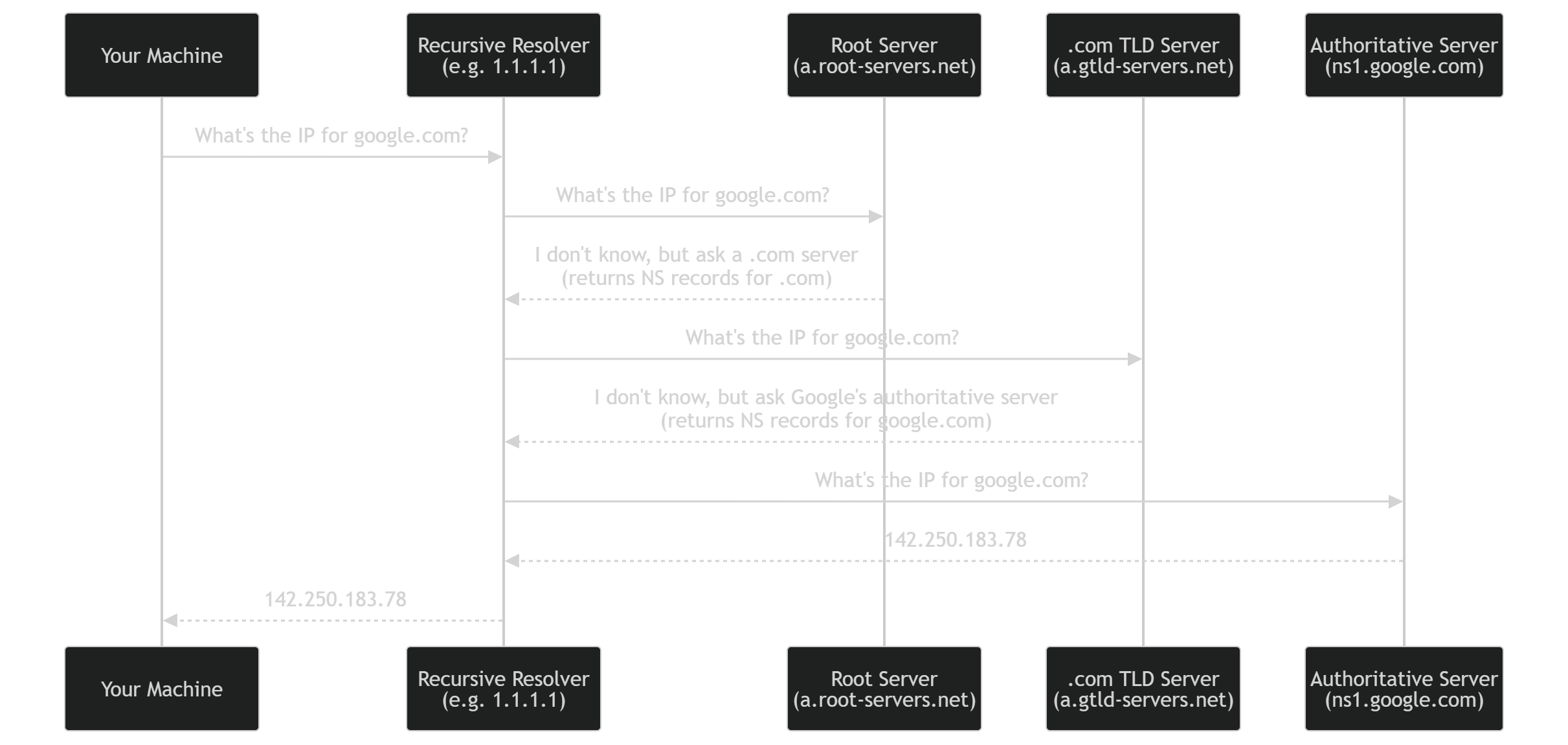
Three referrals, one final answer, then back to you. The total round trip is typically 20-50 ms because each segment caches results from previous queries.
Note: the root doesn't return Google's IP. It only knows where the .com servers live. The .com servers don't return the IP either - they only know where Google's authoritative servers live. Only the authoritative server has the actual record.
6. Record Types (More Than Just A)
A DNS query specifies a type. Different types return different things:
| Type | Returns | Used for |
|---|---|---|
A |
IPv4 address | the basic case |
AAAA |
IPv6 address | IPv6 |
CNAME |
Another domain name | aliases (see CDN section) |
MX |
Mail server hostname + priority | email routing |
NS |
Authoritative name servers | delegation |
TXT |
Arbitrary text | SPF, DKIM, domain verification |
SOA |
Zone metadata | replication, TTLs |
PTR |
Hostname for an IP | reverse DNS |
Try yourself:
dig A google.com
dig MX gmail.com
dig TXT google.com
dig NS google.com
Each query type is independent. Asking for an A record doesn't tell you about MX records.
7. Why CDNs Live and Die by CNAMEs
A CNAME record says "this name is an alias for that name." When the resolver gets a CNAME response, it restarts the lookup using the new name.
This mechanism is what makes CDNs and managed DNS routing possible.
www.yoursite.com.          IN CNAME   yoursite.cdn.cloudflare.net.
yoursite.cdn.cloudflare.net. IN A      104.21.42.7
yoursite.cdn.cloudflare.net. IN A      172.67.180.34
You set www.yoursite.com to a CNAME pointing at Cloudflare. Cloudflare resolves that to whichever edge node is closest to the requesting user. You never have to update yoursite.com's DNS again, even if Cloudflare adds 100 new edge locations next month.
Without CNAMEs, every CDN would need direct write access to every customer's DNS. CNAMEs make CDNs possible.
Catch: CNAMEs cannot coexist with other records on the same name, and they cannot live at the apex (yoursite.com without www.). This is why people use ALIAS or ANAME records (provider-specific extensions) at the apex.
8. TTL - The "Why DNS Changes Take 24 Hours" Mystery
Every DNS record has a TTL (time to live), measured in seconds. It tells caches how long they're allowed to keep the answer before re-asking.
$ dig A google.com +noall +answer
google.com.    300    IN    A    142.250.183.78
              ^^^
              TTL in seconds = 5 minutes
When you change a DNS record, existing caches don't know. They keep serving the old value until their copy expires. With a 24-hour TTL, some users will see the old IP for up to 24 hours after the change.
This is what people mean by "DNS propagation." DNS doesn't actually propagate - caches expire and reload.
Tradeoff:
Low TTL (60s) - fast changes, more queries, more load on authoritative servers, slightly slower page loads (more cache misses).
High TTL (24 h) - fewer queries, cheaper, but painful when you need to migrate.
Best practice: drop TTL hours before a planned change, then raise it back after.
9. UDP, TCP, and the 512-Byte Rule
DNS queries fit in a single packet 99% of the time, so DNS uses UDP on port 53 by default. No handshake, no connection setup, just one packet out and one back.
Original DNS spec capped responses at 512 bytes to fit in one UDP packet. Two things bust this limit:
Large responses - many records, big TXT for SPF, etc.
DNSSEC - cryptographic signatures bloat responses 5-10x.
When the response would exceed 512 bytes, the server sets the TC (truncated) flag in its UDP reply. The resolver then re-sends the same query over TCP on port 53. Modern DNS uses EDNS(0) to negotiate larger UDP responses (up to 4096 bytes), but TCP is still the fallback.
This is also why DNS over HTTPS (DoH) and DNS over TLS (DoT) are recent innovations - encrypted DNS requires TCP-style transport.
10. Watching It Live with dig
dig is the Unix tool that shows the entire conversation. Two flags reveal the most:
dig +trace google.com
This makes dig start at the root and walk down the hierarchy itself, printing each step:
;; QUESTION SECTION:
;google.com.                    IN      A

;; AUTHORITY SECTION (from root):
.                       518400  IN      NS      a.root-servers.net.
.                       518400  IN      NS      b.root-servers.net.
... 13 root servers ...

;; Received 1097 bytes from 198.41.0.4#53(a.root-servers.net) in 11 ms

;; AUTHORITY SECTION (from .com TLD):
google.com.             172800  IN      NS      ns1.google.com.
google.com.             172800  IN      NS      ns2.google.com.

;; Received 836 bytes from 192.5.6.30#53(a.gtld-servers.net) in 24 ms

;; ANSWER SECTION (from authoritative):
google.com.             300     IN      A       142.250.183.78

;; Received 55 bytes from 216.239.32.10#53(ns1.google.com) in 8 ms
Three round trips, each to a different server. The TTLs (518400, 172800, 300) tell you how long each layer caches its answers.
dig +short google.com           # just the IP
dig @1.1.1.1 google.com         # query a specific resolver
dig CNAME www.github.com        # see the CNAME chain
11. Security Model and Weaknesses
DNS was designed in 1983, before anyone worried about adversaries. It shows.
DNS Spoofing / Cache Poisoning. A resolver waits for a UDP response. UDP has no handshake - anyone who can guess the query ID and reply faster than the real server can inject a fake answer. The resolver caches it. Now everyone using that resolver gets the attacker's IP for paypal.com.
Mitigations:
Source port randomisation - adds 16 bits of entropy.
DNSSEC - cryptographically signs records. Resolvers verify the signature before trusting. Adoption is patchy because deployment is operationally painful.
DNS over HTTPS (DoH) - sends queries over HTTPS instead of plain UDP. Encrypts the channel and hides DNS from network observers. Cloudflare's
1.1.1.1and Google's8.8.8.8both support it.DNS over TLS (DoT) - same idea, but on a dedicated port (853) rather than HTTPS.
DoH is controversial because it bypasses network-level DNS filtering used by enterprises and (sometimes) governments. That's a feature for users and a problem for network admins.
12. Putting It Together
The full sequence when you type google.com and hit Enter:

Every step is cached at the layer above it. The full walk from root to authoritative is the worst case, not the typical case. In practice, your resolver usually has TLD answers cached, sometimes the second-level too, and the whole thing finishes in a single round trip.
But when something is genuinely uncached - first lookup of the day, fresh resolver boot, brand-new domain - every layer fires. And it still finishes in 30-50 ms because the hierarchy makes each individual query small and stateless.
Closing Thought
DNS is one of the few internet systems that's barely changed in 40 years. The hierarchy from 1983 still runs the modern internet. Most "improvements" since then have been bolted on without breaking the original design - exactly like TCP window scaling, exactly like HTTP/2's relationship to HTTP/1.
The key idea is the delegation model: nobody has to know everything, but everybody knows who to ask next. That structure is why DNS scales to 350 million domains, why CDNs work, why you can switch hosting providers without anyone noticing, and why a tiny edit in your registrar's panel propagates across the world in hours.
Next time you watch a webpage load slowly, run dig +trace. You’ll be able to see each delegation step directly.
Found this useful? Next post in the series: the TCP three-way handshake - why it's three packets and not two, and how an attacker once brought down a quarter of the internet by exploiting that exact design choice.
