Fellow PPC marketers 👋
Ever felt like you’re shooting in the dark with your campaigns? You tweak a bid here, add a keyword there, and cross your fingers hoping for a performance boost.
I’m a PPC specialist for a B2B SaaS company. Two people managing 30+ Google campaigns across three regions (AMER, APAC, EUROPE).
The problem isn’t making changes. It’s remembering what you changed and whether it actually worked.
Google Ads shows you changes in the performance chart, but you can’t export them alongside your metrics. I used to track everything in a spreadsheet, but that meant hours of tab-switching just to remember what I did before I could start actual optimization work.
So I built a solution using Claude. A Google Ads script that automatically catches every account change and waits 14 days to capture the performance impact.
TL;DR: Scroll down for the script and GitHub repo.
What I needed
A system that would:
Automatically detect account modifications (bids, budgets, keywords, audiences)
Record these changes systematically
Capture performance metrics before changes occurred
Wait 14 days for statistical significance
Record post-change performance metrics
Enable objective comparison (with Sheet’s GPT integration)
At its core, it’s a Google Ads Query script through API calls.
I tested different models. GPT-4o gave mixed results, mostly errors. Grok with DeepSearch and Think mode was inconsistent. Claude worked perfectly on the first try.
Prerequisites
You’ll need:
Google Cloud Project with the Google Ads API enabled
Developer Token for the Google Ads API (Standard Access, not Basic Access)
OAuth authentication configured with appropriate scopes
Google Sheet structured with specific monitoring worksheets
Google Apps Script environment for code execution
How it works
Authentication and API access
First, create reliable access to the Google Ads API through OAuth authentication:
function refreshAccessToken() {
  const url = ‘https://accounts.google.com/o/oauth2/token’;
  const payload = {
    client_id: CONFIG.CLIENT_ID,
    client_secret: CONFIG.CLIENT_SECRET,
    refresh_token: CONFIG.REFRESH_TOKEN,
    grant_type: ‘refresh_token’
  };
  // Execution logic...
}
One critical insight: use Script Properties to store sensitive credentials rather than hardcoding them. Easy to overlook, but essential for security.
Change detection system
The script uses the Change Event API with this syntax:
function checkBidBudgetChanges() {
  const now = new Date();
  const past = new Date(now.getTime() - 24 * 60 * 60 * 1000);

  const startDatetime = Utilities.formatDate(past, ‘America/Los_Angeles’, “yyyy-MM-dd HH:mm:ss”);
  const endDatetime = Utilities.formatDate(now, ‘America/Los_Angeles’, “yyyy-MM-dd HH:mm:ss”);

  const query = `
    SELECT
      change_event.change_date_time,
      change_event.campaign,
      // Additional fields...
    FROM change_event
    WHERE change_event.change_date_time BETWEEN ‘${startDatetime}’ AND ‘${endDatetime}’
      AND change_event.change_resource_type IN (
        ‘CAMPAIGN_BUDGET’,
        ‘AD_GROUP_BID_MODIFIER’,
        // Additional types...
      )
    LIMIT 10000
  `;

  // Processing logic...
}
This query detects different change types across campaign and ad group levels. I hit errors during implementation (API limitations, incorrect query parameters, result handling issues), but after multiple iterations, it worked.
Reference: Google Ads Query Language Grammar documentation for details.
Performance impact measurement
The real value comes from measuring change impact systematically:
function checkFourteenDayUpdates(budgetSheet, audienceSheet, ignoreSheet, ignoreMap) {
  ignoreMap.forEach((entry, changeEventId) => {
    const daysSince = (new Date() - entry.date) / (1000 * 60 * 60 * 24);

    if (daysSince >= 14) {
      // Retrieve and record comparative metrics...
    }
  });
}
This framework enables objective, data-driven assessment of how specific changes affected key performance indicators over a meaningful time period.
Automated analysis
The final enhancement introduced automated analysis of performance shifts:
const formula = `=GPT(”Analyze the data in this row which contains metrics before and after a budget change. Provide insights on how the change impacted these metrics over 14 days. Be concise, informative, and action-oriented.”,${rowRange},0,standard,false)`;
This integration transforms raw performance data into actionable insights, reducing analytical burden and accelerating decision-making.
What it looks like
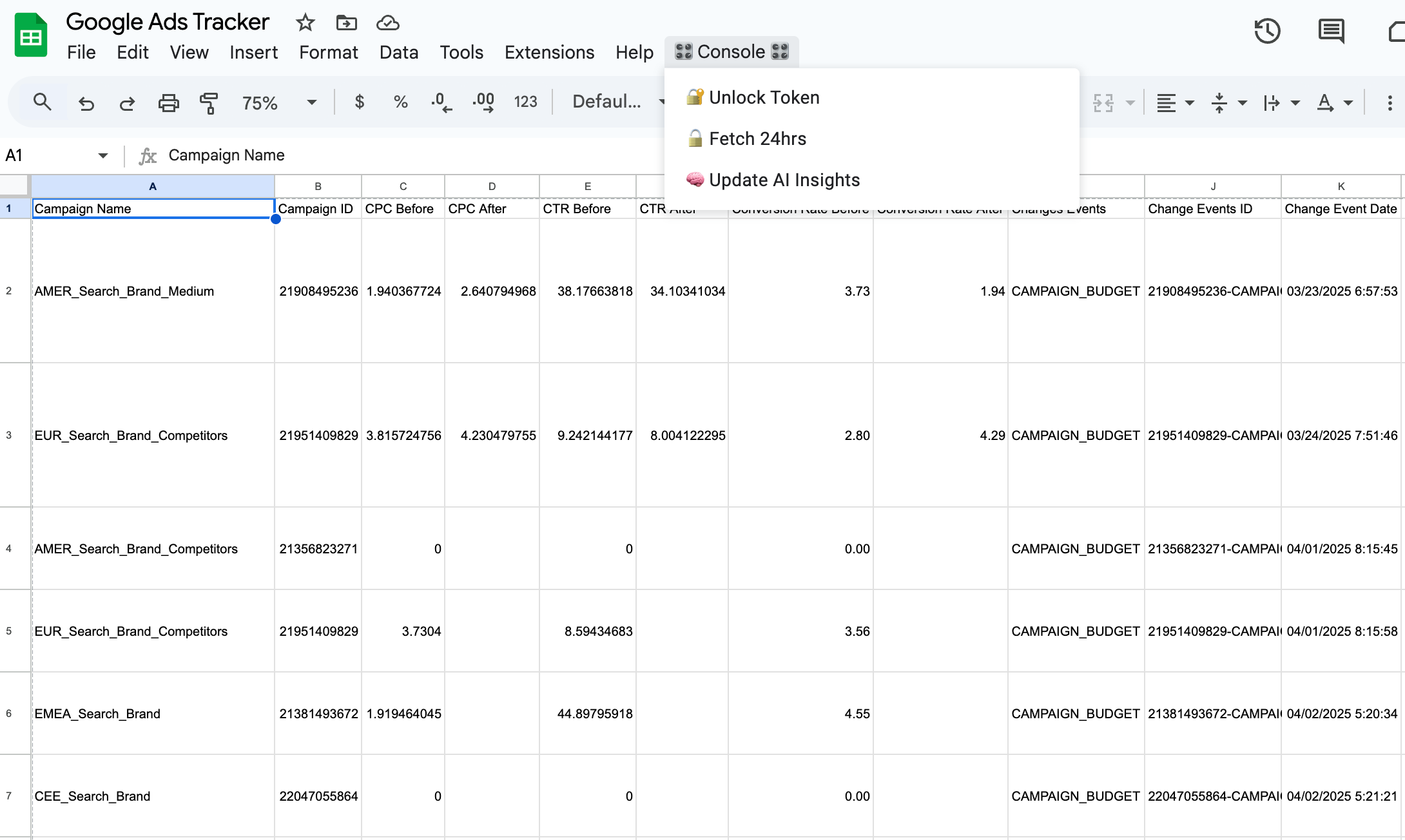
With Claude’s help (and lots of trial and error), I built an MVP. The final product automatically generates analysis that used to take me hours of manual work.
Real impact
After a budget increase in a primary campaign, the system automatically recorded the change and baseline metrics. Two weeks later, it populated comparison data showing an 8% CTR improvement but a 7% CPC increase. The automated analysis noted: “Budget expansion improved overall conversion volume by 12% while maintaining CPA, suggesting successful scale without efficiency loss.”
No more guessing. No more spreadsheet archaeology. Just clear data on what worked and what didn’t.
What I learned
This experience changed my perspective on technical barriers in marketing analytics. Claude’s ability to generate working code from clear requirements is remarkable. You don’t need to be a developer. You need to clearly articulate what you want and what outcome you’re looking for.
For PPC specialists facing similar analytical challenges, this script offers a pathway to developing customized solutions that enhance decision-making and operational efficiency.
Link to my GitHub repo: https://github.com/areus-scorpius/google-ads-api-script
I'm interested in hearing about other technical solutions you've developed for PPC management challenges. What automation gaps have you identified in your workflow?