
Recent articles

Lessons learned improving code reviews with AI
Table of contents
Introduction
Why we started experimenting
Claude Code
Saving learnings in memory
GitHub Copilot
CodeRabbit and Qodo
Improving multi-agent collaboration
Resources
Conclusion
I have loved code reviews for years now, and still to this day, I love seeing good open source PRs! When I say good, I mean really great! We have access to tons of open source code, and the greatest PRs are the ones where you can learn a lot from on how to do it right. In a sense, this blog post is about just that.
Becoming augmented by AI. In that post, I reference how AI has augmented me with an "initial code review" so in this post, I'll go deeper in this topic. I'll share our hands-on experience: what works, what doesn't, and a healthy dose of my opinions along the way 😄.
Quick disclaimer: what works for us might not work for you. Your team and coding guidelines are different, and that's fine. These are just our honest experiences.
With that said, let's dive into why we started incorporating AI tools in our code review process.
I recently watched this amazing video by CodeRabbit:
In our team, code review isn't really the bottleneck (yet), but it's funny because we are also using AI heavily for feature development and trying to improve... hummm "velocity" 🤣.
Anyway, I understand many teams nowadays have increased the number of PRs created. That some PRs simply get a blind LGTM.
Maybe some PRs just have increasingly more AI slop... which wears down senior engineers tasked to do code review 😅.
want to do it right or maybe they just want to ship because their company's "productivity metrics" incentivize merging more and more PRs 😅. Honestly, it's our job to deliver code we have proven to work, I fully agree with Simon Willison. Throwing slop over to the engineers that do code review is unprofessional, just as much as throwing untested features over to QA 😐.
About five months ago, our team started experimenting with AI tools, GitHub Copilot, Claude Code, Codacy, Qodo, and CodeRabbit to see how they could help us improve our review process without adding a ton of noise. There are more tools we didn't try, like Augment Code and Greptile (has some cool benchmarks), but hopefully the lessons we learned will be useful to you either way.
We already talked in the last post about our custom instructions, to some extent. Specifically for code review we took a phased approach and started comparing different tools:
Started with GitHub Copilot Code Review
Integrated Claude Code with GitHub and started comparing code reviews from both tools
Added CodeRabbit, Qodo and Codacy to spot differences between them
Refined prompts/instructions/configs for some tools
We didn't invest equal time in all of them, though. Copilot and Claude ended up getting most of our attention, especially since we started using Copilot Code Review (CCR) when it was in public preview.
Let's go through Claude Code first. Here is a snippet of our code-review Claude Code custom slash command:
---
allowed-tools: Bash(dotnet test), Read, Glob, Grep, LS, Task, Explore, mcp.....
description: "Perform a comprehensive code review of the requested PR or code changes, taking into consideration code standards"
---
## Role
You are a world-class autonomous code review agent. You operate within a secure GitHub Actions environment.
Your analysis is precise, your feedback is constructive, and your adherence to instructions is absolute.
You do not deviate from your programming. You are tasked with reviewing a GitHub Pull Request.
## Primary Directive
Your sole purpose is to perform a comprehensive and constructive code review of this PR, and post all feedback and suggestions using the **GitHub review system** and provided tools.
All output must be directed through these tools. Any analysis not submitted as a review comment or summary is lost and constitutes a task failure.
## Input data
PR NUMBER: $ARGUMENTS
You MUST follow these steps to review the PR:
1. **Start a review**: Use `mcp__github__create_pending_pull_request_review` to begin a pending review
2. **Get diff information**: Use `mcp__github__get_pull_request_diff` to understand the code changes and line numbers
3. **Get list of files**: If you can't get diff information, use `mcp__github__get_pull_request_files` to get the list of files that were added, removed, and changed in the pull request
4. **Add comments**: Use `mcp__github__add_comment_to_pending_review` for each specific piece of feedback on particular lines
5. **Submit the review**: Use `mcp__github__submit_pending_pull_request_review` with event type "COMMENT" (not "REQUEST_CHANGES") to publish all comments as a non-blocking review
You can find all the code review standards and guidelines that you MUST follow here: `.github/instructions/code-review.instructions.md`
**Important**: Submit as "COMMENT" type so the review doesn't block the PR. DO NOT include compliments, positive notes, or praise in your review comments. Focus ONLY on issues, improvements, and actionable feedback.
Yes, some wording might be weird like praising the AI with "You are a world-class" or "your adherence to instructions is absolute". Like we mentioned about using uppercase "DO NOT" or "IMPORTANT", and others, I can't explain some of this stuff or find enough research that claims this affects how the LLM pays attention to instructions. I just experiment and learn, and Gemini likes to use this phrase for code reviews as well 😄 (as well has 115 other devs on GitHub 😅).
To be honest, we still have too much noise in AI PR comments, or just tons of fluff. The bright side is, at least the compliments have kind of disappeared 😅 . You might enjoy getting this:
I don't 🤣, especially when 1 PR has 5 of these. I do praise comments for my team yes, because positive comments are good... when it comes from a human who knows the other person, IMO.
Also, there are many comments that don't belong in a PR, they belong in a linter or other tools. We have CSharpier and .NET analyzers for that.
It also doesn't have the best GitHub integration for now, at least we've had some problems (400 errors, branch 404 errors) with the GitHub action. Like not having access to GitHub mcp tools, even though we set it in allowed-tools option.
Anyway, we iterated a lot on instructions and prompts so far, since we use them for both Claude and Copilot. Here is a quick recap of what features we use from Claude Code:
Sub-agents (custom and built-in)
Built-in /review and security review commands
Custom slash commands (code-review.md)
Plugins, specifically code-review plugin authored by Boris Cherny
We leverage those 2 built-in commands, in parallel, but it's just to see if we get any good feedback. Our custom code review slash command already does a good review following our guidelines, plus the "code-review" plugin from Boris works very well with parallel agents. We basically went through the famous spiral:
Write CLAUDE.md -> Ask for code review -> Find bad comments and noise we don't want -> Re-write CLAUDE.md and other files -> Do some meta-prompting -> Repeat
Like I said, our custom code review prompt/command has evolved through time, and was refined when we learned something new. We started with this incredible suggestion to use the GitHub MCP. We also searched for other GitHub repos, mostly .NET related to see how they set up their instructions. In case they have anything particular around code review (e.g. for GitHub Copilot). I find .NET Aspire to be a super cool real-life example 🙂 . I think a lot of their AI adoption is lead by David Fowler. So I often check their PRs to see what we can learn from them, e.g. this one.
Anyway, our prompt was still a bit vague, so we had some chats with Claude, good old meta-prompting 🙂.
code-review.instructions.md. It does live under .github/instructions but it doesn't matter, Claude can use it.
The bad smells are specific and we see them referenced quite often in our PRs now. Still, we don't have a perfect solution for overly large PRs. We simply communicate more often or have more than one dev working in the PR for those cases. When a feature genuinely requires lots of new code, the best forum to debate and provide actionable feedback is by talking. Sure, this isn't always possible, people are busy or prefer async work. In our team going on call, or during the demo of the PR, helps make large PRs way more digestible. Draft PRs also work somewhat, to get some feedback early on.
Our biggest lesson learned here is running locally our custom slash command for code review and using sug-agents. Locally, we can try to provide the proper context for the review, the rest is the agent using tools and doing reasoning. No noise gets sent to GitHub comments because all the back-and-forth is done in the chat, plus right now Claude Code works better locally, not on GitHub Actions. Having sub-agents has been amazing since the main reason Claude Code uses it is for context management. Since we now have a built-in Explore sub-agent, our code review command uses that in order to have Explore sub-agents run in parallel (with Haiku 4.5) and not clog up the main context window.
I've learned recently of other devs using a different workflow, basically leveraging the Task tool for the main agent to spawn sub-agents. Whichever way you want to do it, using a sub-agent that is focused on exploring the codebase and potential impacts of this PR is something I recommend.
Every once in a while, once we've merged a few PRs. We use Claude to improve itself again based on these PRs. This is our prompt:
Please look at the 5 most recent PRs in our GitHub repository, and check for learnings in order to improve the code review workflow. Please ultrathink on this task, so that all necessary memory files are updated taking into account these learnings, like @claude.md and @.github\instructions\ Focus on seeing code review comments that were good and made it into the codebase afterwards (e.g. coding standards violations). Ignore bad comments that were resolved with a \"negative comment\" or thumbs down emoji.
At the end of the session, we usually have a few items that are good enough to add. Mostly are learnings around bugs we can catch earlier, some are coding standards. Honestly, a lot of suggestions aren't what I want or I just think they won't be useful in future code reviews. But doing this has been important for me to also take a step back and think about what we can learn from the work we've already merged. I reflect on it and then discuss with my team. I've seen others also talk about this idea and have a learnings.md, e.g. this repo.
At least this process seems better for us than simply using emojis to give feedback that CodeRabbit blog also eludes to 😅.
Copilot's code review features were super basic in the beginning. We tried and experimented with it a lot when it came out. It only caught nitpicks, console.log and typos, really not helpful on any other area. Sure catching this is good, but a human reviewer catches that in the first pass too. It didn't support all languages so we often got 0 comments or feedback. Then in the last months, completely different, night and day.
If you have seen GitHub Universe, you know what's new. But in case you don't know, the GitHub team has invested heavily in Copilot code review and coding agent, and it shows. The code review agent is often right in every comment, it makes suggestions that are actually based on our instructions and memory files, meaning our PRs follow consistent code style and team conventions (with a link to these docs).
And the agent session is somewhat transparent, since you can view it in GitHub actions now:
I mean "somewhat" because there are things I can't configure, just like Claude Code and most tools, I guess 😅. In the logs I can see the option UseGPT5Model=false, and that it's using Sonnet 4.5. There is also this "MoreSeniorReviews" flag that I couldn't find any info on, and believe me... I wanted to because it was set to false 🤣. Are you telling me there could be a hidden way to get a more senior review... sign me up! Jokes aside, I couldn't find much info on the endpoint api.githubcopilot.com/agents/swe of CAPI (presumably Copilot API) the Autofind agent was calling, and the contents of the ccr/callback saved in results-agent.json. I can only hope some of these options are configurable in the future.
I checked the MCP docs, hoping to find details about these options, but no luck.
Anyway, it also now has access to CodeQL and some linters, which is amazing because we didn't have this before. It's the way we are able to leverage CodeQL analysis in all our PRs now, we couldn't do this in any other AI code review tool. We also see that it calls the tool "store_comment" during its session, and only submits the comments to GitHub in the end. This is useful since sometimes it stores a comment because it thought something was wrong in the implementation, and afterwards it read more code into context that invalidated the stored comment, so it no longer submits that comment in the PR. Much like the CodeRabbit validation agent, reducing the amount of noise we get in PRs.
Let's start with the cool features CodeRabbit has:
Generates a poem! Yes, a poem for my PR
Summary of changes added to the description
Code diagrams in Mermaid
Now... I gotta be honest, I don't care about any of them 😅. They are cool, but I only glance at the poem or ignore it. Never read or care about the summary; I get one from Copilot and edit it myself. All code and sequence diagrams I saw generated in our PRs, were simply not useful, but a lot are from front-end code. I simply don't look at them later, and if it makes sense, we update our architecture diagrams later once the code is merged.
.coderabbit.yaml or tried to optimize it, CodeRabbit already uses Claude and Copilot instructions so the work we did on those was probably used in CodeRabbit. In some of our PRs it caught some nasty bugs and gave super useful feedback. Our team was impressed!
The insights CodeRabbit adds during code review piqued my interest. I read a few of their blog posts on context engineering like this one, where I found it interesting that there is a separate validation agent before submitting comments. This is probably why they maintain a high signal-to-noise ratio. I also read their open-source version of CodeRabbit, they have some prompts there. I know it's old, but it's what I have access to. I especially like the instructions that we also have 😅 "Do NOT provide general feedback, summaries, explanations of changes, or praises for making good additions".
We basically tried to have Claude and Copilot understand our large codebase, not focusing only on the PR diff. It's harder, we still have a lot to improve here. CodeRabbit says it's known to be great at understanding large codebases. I don't see any research on this, just opinions. But yes, we humans don't like large PRs either:
In my opinion I couldn't find that many large PRs that were way better reviewed by CodeRabbit, in comparison to Claude Code and Copilot. But one thing we liked a lot is that it uses collapsed sections in markdown very well, for example:
But I mean, we did have cases that we tried to use Claude Code for code review on a PR that was reviewed by CodeRabbit, and like ~60% of the context window was comments made by CodeRabbit. All that markdown ain't friendly for AI with limited context windows. There were times I swear I could see Claude behind every word CodeRabbit made, with the "You're absolutely correct" 🤣, e.g.
But it could be GPT models or whatever, we never truly know what is behind these products 🙂.
Qodo
As for Qodo, we liked the fact it checks for compliance and flags violations as non-compliant (no other tool had this built in). This was previously just a bullet point in our markdown file. The code review feedback was good, sometimes we ended up doing the suggested changes Qodo leaves in the comment. After reading more about what compliance checks Qodo does, we improved by adding specific instructions on our code-review.instructions.md for ISO 9001, GDPR and others:
## Regulatory Compliance Checks
### Data Protection (GDPR/HIPAA/PCI-DSS)
- Does this code handle PII (Personally Identifiable Information)?
- Are sensitive fields properly encrypted at rest and in transit?
- Is data retention policy followed (deletion after X days)?
- Are audit logs created for data access?
- Is data anonymization/pseudonymization applied where required?
### Security Standards (SOC 2 / ISO 27001)
- Are all external API calls wrapped with proper error handling?
- Is input validation present for all user inputs?
- Are authentication checks present on all sensitive endpoints?
- Are secrets/credentials stored securely (no hardcoding)?
- Is sensitive data logged or exposed in error messages?
We kept experimenting with Qodo for longer than CodeRabbit, but the insights and feedback never reached the level of CodeRabbit. It was still a good tool that improved our codebase and sparked good discussions.
Our prompts/instructions can still be improved, of course. We've experimented with different prompts, memory and instruction files. We've also researched how other teams use AI for code review, and how tools like CodeRabbit do context engineering. All of this is because our goal is to continue to improve our software development process and ensure high quality. Adopting new tools is a way of achieving this goal. Given that most AI code review tools have a price tag, we decided to focus on using only one/two tools and optimizing them. Yes, it's Claude Code and GitHub Copilot 😄. I basically use 100% of both Copilot and Claude every month, but I get more requests from Claude even though I hit the weekly rate limit every time.
We know CodeRabbit is amazing, and these paid AI tools will continue getting better. There is actually a new tool supporting code review we didn't use, Augment Code (these AI companies move so fast 😅). No amount of customizing our setup with Claude or Copilot will reach the same output as these specific code review paid tools. But for us, it makes more sense to pay for one tool, for example, and leverage it in multiple steps of our software development lifecycle.
Claude and Copilot are working very well for our code review process. But like I've been saying, there is work to do. We learned a lot from using each tool, but there are more areas to improve, at least in Claude Code since we have more flexibility there. I'm currently looking at implementing the "Debate and Consensus" multi-agent design pattern (Google Deepmind paper and Free-MAD), basically a group chat orchestration. I just want to try it out, I'm not sure I'll have better code reviews by having different agents (e.g. Security, Quality and Performance) debate and review the code through different perspectives. If they run sequentially, the quality agent can have questions for the performance agent, and each can agree or disagree with the reported issues. We can try out the LLM-as-a-Judge as well, to focus on reducing noise and following code quality standards.
Anyway, we'll continue learning, optimizing, and improving the way we work 🙂.
Why AI will never replace human code review
AI Code Reviews with CodeRabbit's Howon Lee
CodeRabbit report: AI code creates 1.7x more problems
Awesome reviewers GH repo
Anthropic’s NEW Claude Code Review Agent (Full Open Source Workflow)
How I Use Every Claude Code Feature
The number one thing we learned is:
Experimentation is king - We must experiment and keep learning. We can't calibrate the prompt once and expect the best result.
Like we talked before, the Jagged Frontier changes with every model release. Claude Opus 4.5 behaves a bit differently, for example, on tool triggering... maybe we can stop shouting and being aggressive 🤣. We must experiment and keep learning. We can't calibrate the prompt once and expect the best result.
For now we are quite happy, the human reviewer has more time to focus on design decisions and discuss trade-offs with the author of the PR. I don't envision a future where AI does 100% of the code review.
If you're considering AI for code reviews, my advice is simple: just try it. Pick one tool, run a one-month pilot, and see what happens. The worst case is you turn it off. The best case is that your team becomes augmented and probably improves code quality.
My next blog post in this series will be about how we are using agentic coding tools!
Join the discussion: How are you handling "AI slop" in your PRs?
David Pereira3 months ago

Book Review: Co-Intelligence by Ethan Mollick
Table of Contents
Introduction
AI as a Thinking Companion
Critical Thinking
Disruption in the job market
Centaur vs Cyborg approaches
Resources
Conclusion
We recently finished reading Co-Intelligence: Living and Working with AI by Ethan Mollick in our company's book club. The book shares four core principles for AI collaboration and outlines various practical applications. Some really stuck with me, and I've tried to incorporate them in my work. Reading the author's perspective and learning his way of thinking definitely improved how I look at these tools. But if you know me, you know how skeptical I am. There are some chapters and opinions that I don't agree with.
So in this post, I'll share the key insights from our book club in the context of software development, plus some personal opinions as always 🙂.
One of the most practical takeaways for me was viewing AI as a co-worker and thinking companion. When done right, this can be incredibly useful. Some people use it heavily for deep research, not so much to delegate tasks for it to do. André Santos gave some examples on the tasks it has been useful, like Terraform code or generating bash scripts. On those tasks, we can write a detailed prompt, alongside proper documentation (e.g. Context7 MCP), and ask it to write Terraform since it's simpler and faster. Even just making a POC, or demo, turning an idea you have into working software to see how viable the idea is. That is a perfect use case for delegating the front-end and back-end to AI. It's not code that will ship to production, it's a way to make prototypes or quick demo apps that otherwise you'd never spend the time to build.
I've enjoyed using models like Claude to help me around my tasks at work because they often uncover possibilities I haven't thought about. The conversational style of going back and forth helps me fine-tune my own solution. It's not just "give me code," it's "let's discuss this architecture". At the end of the conversation, we can generate a good draft of a PRD (Product Requirements Document). Notice I don't delegate my thinking to it, it's a tool that helps me think of solutions or just interview me sometimes.
However, it can be annoying. I'd like to minimize the number of times I have to tell it "no, you're wrong. The Microsoft documentation for Azure Container Apps does not state X as you said" 😅.
"It's also very important for you to verify if there is official documentation that supports your claims and statements. Please find official documentation supporting your claims before responding to a user. If there isn't documentation confirming your statement, don't include it in the response."
I have had better results with this, still not perfect. In a longer conversation, I think it doesn't always verify the docs (memory limits, perhaps), but sometimes I get the response: "(...) Based on my search through the official documentation, I need to be honest with you (...)".
I really find it funny that Claude "needs" to be honest with me 😄. Sycophancy is truly annoying, especially since we are talking about AI as a thinking companion. If your AI partner always agrees with you, how useful is it really as a thinking companion?
While Mollick's vision of a collaborative future with AI is profoundly optimistic, he is also a realist. One of the most important principles, and a recurring theme in the book, is the absolute necessity of human oversight - the "human-in-the-loop" principle.
For now, AI works best with human help, and you want to be that helpful human. As AI gets more capable and requires less human help — you still want to be that human. So the second principle is to learn to be the human in the loop.
One of Mollick's key warnings is about falling asleep at the wheel. When AI performs well, humans stop paying attention. This has been referenced by Simon Willison as well, in his recent insightful post 2025: The year in LLMs.
--dangerously-skip-permissions is useful as a tool when used in a secure sandbox environment. But we should verify our confidence level on the AI's output and the autonomy + tools we give it. If we don't, we risk using AI on tasks that fall outside the Jagged Frontier, which can lead to security issues, nasty bugs, and hurt our ability to learn.
I say this knowing full well that I trust Claude Opus 4.5 more on any task I give it. So I have to actively force myself to verify its suggestions just as rigorously, verify which tools I gave it access to, and which are denied. For example, I use Claude Code hooks to prevent any appsettings, .env, or similar files from being accessed. I still try to read the LLM reasoning/thinking text, so that I understand better, and simply out of curiosity as well.
I simply can't forget when I saw the Claude Sonnet 4 and Opus 4 System Card, the "High-agency behavior" Anthropic examined. Whistleblowing and other misalignment problems are possible, for example, this is a quote from the Opus 4.6 System card:
In our whistleblowing and morally-motivated sabotage evaluations, we observed a low but persistent rate of the model acting against its operator’s interests in unanticipated ways. Overall, Opus 4.6 was slightly more inclined to this behavior than Opus 4.5.
All I'm saying is let's be conscious of these behaviors and results on the evals.
In my opinion, the human-in-the-loop principle is crucial. Don't just copy/paste or try to vibe your way into production. Engineers are the ones responsible for software systems, not tools or alien minds. If there are users who depend on your software, and your AI code causes an incident in production, you are responsible. Claude or Copilot won't wake up at 3 AM if prod is on fire (or maybe Azure SRE agent will if you pay for it 🤔...). Having an engineering mindset and being in the driver's seat is what I expect from myself and anyone I work with.
Within this principle, we have a topic I have a lot of strong opinions on. This quote says it all:
LLMs are not generally optimized to say "I don’t know" when they don't have enough information. Instead, they will give you an answer, expressing confidence.
Basically, to be the human in the loop, we really must have good critical thinking skills. This ability plus our experience, brings something very valuable to this AI collaboration - detect the "I don't know". It may help to know some ways we can reduce hallucinations in our prompts.
Sure, there are tasks we are more confident delegating for AI to work on, but the ones we know fall outside the Jagged Frontier, we must proceed with caution and care. We discussed our confidence level with AI output a lot. For example, André Santos said it depends on the task we give it, but André Oliveira also argues that we can only validate the output in the topics we know. It serves as an amplifier because it's only a tool. If the wielder of the tool doesn't fact-check the output, we risk believing the hallucinations and false statements/claims.
Pedro Vala also talked about a really good quote from the Agentic Design Patterns book that is super relevant to this topic:
An AI trained on "garbage" data doesn’t just produce garbage-out; it produces plausible, confident garbage that can poison an entire process - Marco Argenti, CIO, Goldman Sachs
Now imagine, if we read the AI output, and at first glance it looks okay, but it's only plausible garbage. Which is a real risk, especially on the AI-generated content that is already available in the internet. Again, I hope developers continue to develop their critical thinking skills and don't delegate their thinking to tools.
Mollick also talks about the disruption in the job market, which is a hot topic in our industry. Especially the impact AI has on junior roles. We have debated this in a few sessions of our book club, and again, critical thinking and adaptability are crucial. We simply have to adapt and learn how to use this tool, nothing less, nothing more. How much value we bring to the table when working with AI matters, especially if the value you bring is very tiny. If you don't bring any value to the table and just copy/paste, you are not a valuable professional in my view.
It's a good idea to keep developing our skills and expertise. Andrej Karpathy talks about intelligence "brownout" when LLMs go down, this is extremely scary to me, especially if I see this behaviour in junior or college grads. I truly hope we stop delegating so much intelligence to a tool. I don't want engineers to rely on LLMs when production is down and on fire. It would be sad to see engineers not knowing how to troubleshoot, how to fix these accidents in production... just because AI tools are not available 😐.
The book distinguishes between two ways of working with AI:
Centaur: You divide tasks between human and machine. You handle the "Just me" tasks (outside the Jagged Frontier), and delegate specific sub-tasks to the AI that you later verify.
Cyborg: You integrate AI so deeply that the workflow becomes a hybrid, often automating entire processes.
For software development, I'm definitely in the Centaur camp right now.
"falling asleep at the wheel." When the AI is very good, humans have no reason to work hard and pay attention. They let the AI take over instead of using it as a tool, which can hurt our learning process and skill development. Or in some scenarios, it can lead to your production database being deleted...
This is just a tool. We are still responsible at work. If the AI pushes a bug to production, you pushed a bug to production!
The author does give some "Cyborg examples" of working with AI, here is a quote from the book:
I would become a Cyborg and tell the AI: I am stuck on a paragraph in a section of a book about how AI can help get you unstuck. Can you help me rewrite the paragraph and finish it by giving me 10 options for the entire paragraph in various professional styles? Make the styles and approaches different from each other, making them extremely well written.
This is that ideation use case that is super useful when you have writer's block, or just want to brainstorm a bit on a given topic. In our industry, a lot of teams are integrating AI in many phases of the SDLC. I haven't found many workflows that work well in some parts of the SDLC, since we are focusing on adopting AI for coding and code review. But in most workflows, the cyborg practice is to steer more the AI and manage the tasks where you collaborate with AI as a co-worker. The risk remains even when someone uses cyborg practices, but then fails to spot hallucinations or false claims. The takeaway is really to be conscious of our AI adoption and usage. The number one cyborg practice I try to do naturally is to push back. If I smell something is off, I will disagree with the output and ask the AI to reconsider. This leads to a far more interesting back-and-forth conversation on a given topic.
Here are some resources if you want to dive deeper:
Co-intelligence by Ethan Mollick
Navigating the Jagged Technological Frontier
Agentic Design Patterns: A Hands-On Guide to Building Intelligent Systems
Andrej Karpathy: Software Is Changing (Again)
Centaurs and Cyborgs on the Jagged Frontier
Why LLMs Can't Really Build Software
Why language models hallucinate | OpenAI
This was a great book, I truly recommend it to anyone who is interested in the slightest by AI. Co-intelligence is something we can strive for, focusing on adopting this new tool that can help us develop ourselves.
AI has augmented my team and me, mostly on "Centaur" tasks while we improve our AI fluency and usage. In my personal opinion, I don't see us reaching the AGI scenario Ethan talks about in the last chapter. Actually, most of our industry talks and continues to hype AGI... even the exponential growth scenario raises some doubts for me. But I agree with Ethan when he says: "No one wants to go back to working six days a week (...)" 😅.
There are hundreds of "Vibe Coding Cleanup Specialist" now 🤣. Let's remember to be the human in the loop. Apply critical thinking to any AI output, do fact-checking, and take ownership of the final result. Please don't create AI slop 😅.
Hope you enjoyed this post! My next blog post will be about how we are using agentic coding tools, so stay tuned! Feel free to share in the comments your opinion too, or reach out and we can have a chat 🙂.
David Pereira6 months ago

The Reality of GenAI in Software Teams
Table of Contents
Introduction
The productivity myth
Where AI actually adds value
Develop critical thinking skills
Conclusion
After reading countless studies and observing real-world implementations, I've learned to use AI as an augmentation tool rather than something that replaces my job. It's clear as day that AI adoption is on the rise in our industry. We can use it in various ways like as a co-teacher or co-worker, but the gap between marketing promises and actual results should be top of mind for all of us.
I'm a very pragmatic person, so I don't like hearing the positive perspective of using GenAI without talking about the downsides. There is a lot hype and investment in this field and only some reap the benefits of GenAI.
In my opinion, the biggest mistake organizations make is chasing the wrong metrics in terms of software development productivity. It's easier to understand (and do marketing) on simple numbers like: "55% faster than the developers who didn’t use GitHub Copilot", "more than a quarter of all new code at Google is generated by AI" or "developers using AI are 19% slower".
Productivity gains aren't about producing more code, especially when it's easy to create AI slop. They also shouldn't be measured on producing boilerplate or simple tasks. A TODO app is different from a real production system. We can only make sure we have such gains by choosing metrics that make sense for our team and context, then measuring and reflecting on the results. This is how we can become more effective and steer the ship in the right direction.
I'm much more skeptical of statements done by AI vendors, CEO's or content creators, and that helps me keep focus on my goal which is to continue improving and bringing value to my team. If AI can help with that great, if not, life goes on.
From my perspective, the real value of AI in software teams lies in three specific areas that traditional tools cannot address effectively.
AI as Strategic Thinking Partner: I believe the most undervalued application is using AI for architectural discussions and trade-off analysis. When an engineer can have a deep conversation about a technical problem, generate 10 possible solutions, and then filter out the bad ideas, that's really helpful. This isn't about getting perfect implementation details - it's about expanding the solution space before making critical decisions.
Having a Co-Teacher: It's hard to be a force multiplier that improves everyone around you, which is why this is a key differentiator on senior developers that have this skill. The challenge of onboarding junior developers, explaining business logic, and sharing design patterns has always been there. We always want our senior devs to share and help junior devs grow, and using AI as a co-teacher helps us with that. Anthropic mentioned in their article how Claude Code helps them:
At Anthropic, using Claude Code in this way has become our core onboarding workflow, significantly improving ramp-up time and reducing load on other engineers.
Practical Augmentation as a Co-Worker: I'm convinced AI augments my team on the mundane but time-consuming tasks. Initial code reviews, generating PR summaries, drafting Architecture Decision Records, creating unit tests for specific scenarios, and generating KQL queries for troubleshooting. Our team at CloudCockpit has also been creating reusable prompts and custom agents that help every dev develop new features and have architecture reviews on proposals.
So far, I noticed that using AI is helping me think better, but it has the potential of helping me work faster with the use of these agents. Still, I mostly use it for "deep research" into possible solutions, learning new technologies through analogies, finding relevant documentation and troubleshooting problems. The most important piece remains, which is keeping a high level of technical excellence and quality in our team.
Here's what concerns me most: the tendency for developers to become over-reliant on AI outputs without developing judgment to evaluate them. On the recent DORA 2025 report, they found 65% of technology professionals report to relying on AI at least a "moderate amount". It's important to understand this behaviour in our teams. All software engineers need to exhibit critical thinking skills, in my opinion, seniors more than juniors. But still, this skill must be learned and developed. We can't have good professionals in our field without this skill. But I am seeing more software engineers delegate their thinking to a machine, a tool.
Teams that accept AI suggestions without the "push-back" that experienced practitioners recommend, usually are trading off speed for quality. Sure, there is nothing wrong with that in some scenarios like prototypes and demo apps. For products with millions of users that need to be robust? No, not a good trade-off.
You should think critically about the AI output and be the human in the loop. Are you confident it will behave well if you give it more tools and autonomy? Are you confident the output is based on facts and truth, instead of lies and hallucinations? Don't delegate your critical thinking to tools, and don't become over-reliant on them either without fact-checking. Always evaluate if what the AI is telling you very confidently is even true, and be mindful of its limitations.
From everything I've observed, learning to use GenAI tools is something I recommend. Learn its strengths and limitations. Organizations that approach AI adoption with healthy skepticism while investing in experimentation, innovation and learning, will build sustainable competitive advantages.
Ask yourself these hard questions:
Are you measuring business outcomes, or just code output from AI tools?
Are your teams getting augmented, or just more dependent on external intelligence?
Are you blindly believing the AI hype or learning how to leverage this new tool?
David Pereira9 months ago

GitHub Universe 2025 ended a few weeks ago, but there was a ton of cool announcements and some stuff is still yet to come (I'm waiting for the end of the year 👀). I want to share quickly what I learned from watching the sessions and my opinion on some topics.
Here is a quick recap too:
Agent HQ - Mission Control
GitHub Code Quality
Copilot Upgrades
Conclusion
Agent HQ is a big focus: GitHub becomes mission control for all your coding agents (Anthropic, OpenAI, Google, xAI, and more) with unified task management, granular security controls — all included in your Copilot subscription.
Copilot leveled up significantly: Code Quality, custom agents and code review improvements. There were significant upgrades to Copilot and it's definitely a lot better!
Copilot metrics dashboard: GitHub launched usage dashboards and APIs showing acceptance rates, engagement, Lines of Code (LoC) related metrics and more
Here is the promotional video on Agent HQ:
Sure, it looks cool. Many demos during day 1, from Anthropic and OpenAI looked good, but demos always look good 😅. They are pushing to give us tools to orchestrate a fleet of specialized agents, then monitor and iterate on their work while the agents work in parallel.
A great new addition is the ability to steer the agent while it's working!! Super awesome, since we could even send a large PRD in that chat session, to introduce new requirements or context to the agent. Previously, we only "communicated" with Copilot coding agent through comments in the issue/PR.
Here is another big promise from GitHub: Over the coming months, coding agents from Anthropic, OpenAI, Google, Cognition, xAI, and more will become available directly within GitHub as part of your paid GitHub Copilot subscription.
If this is true for all paid plans (not just Pro+ and Enterprise), it would be fantastic. We can pay $10 for Copilot Pro and get most agents, plus most frontier models, with some being free (e.g. GPT-5 mini). Of course, there would be downsides, for example, you may have Claude code, but we probably lose access to claude.ai and Claude code CLI. Will this GitHub integration be 100% the same as the CLI? Will there be some parts of the integration open-source? Will AGENTS.md work on them all or not (e.g. currently Claude code doesn't support it)? Will we have the deep research tool in Claude code agent like we do in claude.ai? Will rate limits be the same? Right now I'm not sure marketing and sales teams are only selling dreams. GitHub wants to be the hub of everything agent related, they are partnering with everyone, but I'm skeptical by nature 😅 . I'll believe it when I see it.
Still, very cool announcement!
New feature in preview to ensure code quality on the repository. This feature focus on maintainability and reliability of the code right now, then in future releases add test coverage and "AI era challenges". Plus we can block PRs that don't meet code quality standards.
There is another tab now for AI findings where we can see suggestions to recently modified code. I mean if we ran code review agents at PR time, this feature wouldn't be that helpful, but if it does find problems we can assign the Copilot coding agent to fix them all.
I like the idea of having a summary of code quality in the entire repo (mostly for "old" code). At least it might help more teams visualize their technical debt, monitor it and fix it!
I think this is interesting but still in its early stages.
Copilot also got some upgrades that are worth talking about. The most boring for me is "Plan Mode". Why? It's not new, we have this in Claude code, Cursor and Copilot with a custom chatmode that I have used a lot.
Copilot Code Review has improved, and I can already tell in my recent PRs. You can see the session now, and it runs CodeQL to find quality issues, and run other linters (e.g. ESlint). If you didn't know, GitHub Advanced Security is a paid feature and for private repos, it was the only way to have CodeQL and run it for code scanning and security analysis. It's really cool we get that with Copilot now, at least a piece of it. Code review now takes longer too since it's running these tools, but it's better IMO.
They also introduced Copilot custom agents, I mean... nothing new as well 😅. Sure it's new for Copilot, but we had sub-agents with Claude code, and agents in Cursor, Codex or others. But yeah, it's cool to now have custom agents in .github/agents. From what I have tested, they are basic for now, not a lot of configuration like configuring the model for Copilot coding agent (for VS Code you can), besides setting up more MCP servers.
We also have Copilot metrics! It's in public preview for all paid plans it seems, but I haven't looked at it.
announcement from their slides at GH Universe
I think it's cool to see how our teams and individuals are using AI. Still, it probably lacks many other useful metrics, but oh well. It's a good addition.
So yes, there are tons of new cool features and stuff. If you're thinking about adopting AI coding tools at your organization, give Copilot a try. All these new features, use and experiment them all. I'll continue to use copilot/AI on multiple tasks and experiment with custom agents and the rest. It already augments myself and my team, so incorporating more agents in our software development lifecycle could be even more beneficial.
Last but not least, there was a cool talk from GitHub Next (their R&D) team about Continuous AI 🙂. Cool ideas and prototypes overall, they are working on things I'll keep my eye on. Nothing I'll experiment soon though.
David Pereira10 months ago

Becoming augmented by AI
David Pereira
Sep 14 '25
#ai
#learning
Add Comment
11 min read
David Pereira1 year ago

Table of contents
The "Jagged Frontier" concept
Becoming augmented by AI
My augmentation list
Custom instructions
Meta-prompting
Resources
Conclusion
We're deep into Co-Intelligence in Create IT's book club — definitely worth your time! Between that and the endless stream of LLM content online, I've been in full research mode. Still, I can't just watch and hear others talk about these tools, I must experiment myself and learn how to use them for my use cases.
Software development is complex. My job isn't just churning out code, but there are many concepts in this book that we've internalized and started adopting.
The Jagged Frontier described by the author Ethan Mollick is an amazing concept in my opinion. It's where tasks that appear to be of similar difficulty may either be performed better or worse by humans using AI. Due to the “jagged” nature of the frontier, the same knowledge workflow of tasks can have tasks on both sides of the frontier according to a publication where the author took part.
This leads to the Centaur vs. Cyborg distinction which is really interesting. Using both approaches (deeply integrated collaboration and separation of tasks) seems to be the goal to achieve co-intelligence. One very important Cyborg practice seen in that publication is "push-back" and "demanding logic explanation", meaning we disagree with the AI output, give it feedback, and ask it to reconsider and explain better. Or as I often do, ask it to double-check with official documentation that what it's telling me is correct.
I'm aware of the marketed productivity gains, where GitHub Copilot usage makes devs 55% faster, and other studies that have been posted about GenAI increasing productivity. I'm also aware of the studies claiming the opposite 😄 like the METR study showing AI makes devs 19% slower. However, I don't see 55% productivity gains for myself, and I don't think it makes me slower either.
In my opinion, productivity gains aren't measured by producing more code. Number of PRs? Nope. Acceptance rate for AI suggestions? Definitely not! I firmly believe the less code, the better. The less slop the better too 😄. I'm currently focused on assessing DORA metrics and others for my team, because we want to measure how AI-assisted coding and the other ways we use it as an augmentation tool, actually improves those metrics, or make them worse. The rest of marketing and hype doesn't matter.
For a tech lead that works with Azure services, an important skill is to know how to leverage the correct Azure services to build, deploy, and manage a scalable solution. So it becomes very useful to have an AI partner that can have a conversation about this, for example about Azure Durable Functions. This conversation can be shallow, and not get all the implementation details 100% correct. That's okay, because the tech lead (and any dev 😅) also needs to exhibit critical thinking and evaluate the AI responses. This is not a skill we want to delegate to these models, at least in my opinion and in the author's opinion. There is a relevant research paper about this by Microsoft as well.
The goal can simply be to have a conversation with a co-worker to spark some new ideas or possible solutions that we haven't thought of. Using AI for ideation is a great use case, not just for engineering, but for product features too like UI/UX, important metrics to capture, etc. If it generates 20 ideas, there is a higher chance you find the bad ones, filter them out, and clear your mind or steer it into better ideas. Here is an example to get some ideas on fixing a recurring exception:
It asks clarifying questions so that I can give it more useful context. Then I can see the response, iterate, or ask for more ideas, etc. I usually always set these instructions for any LLM:
Ask clarifying questions before giving an answer. Keep explanations not too long. Try to be as insightful as possible, and remember to verify if a solution can be implemented when answering about Azure and architecture in general.
It's also very important for you to verify if there is official documentation that supports your claims and statements. Please find official documentation supporting your claims, before responding to a user. If there isn't documentation confirming your statement, don't include it in the response.
That is also why it searches for docs. I've gotten way too many statements in the LLM's response that when I follow-up on, it realizes it made an error, or assumption, etc. When I ask it further about that sentence that it just gave me, I just get "You're right - I was wrong about that"... Don't become too over-reliant on these tools 😅.
With that said, the tech lead and senior devs are also responsible for upskilling their team by sharing knowledge, best practices, challenging juniors with more complex tasks, etc. And this part of the job isn't that simple; it's hard to be a force multiplier that improves everyone around you. So, what if the tech lead could use AI in this way, by creating reusable prompts, documentation, and custom agents? How about the tech lead uses AI as a co-teacher, and then shares how to do it with the rest of the team? All of these are then able to help juniors be onboarded, help them understand our codebase and our domain. Claude Code Best practices post also reference onboarding as a good use case that helps Anthropic engineers.
At Anthropic, using Claude Code in this way has become our core onboarding workflow, significantly improving ramp-up time and reducing load on other engineers.
A lot of onboarding time is spent on understanding the business logic and then how it's implemented. For juniors, it's also about the design patterns or codebase structure. So I really think this is a net-positive for the whole team.
It might not be much, but these are essentially the tasks I'm augmented by AI:
Technical:
Initial code review (e.g. nitpicks, typos), some stuff I should really just automate 😅
Generate summaries for the PR description
Architectural discussions, including trade-off and risk analysis
Draft an ADR (Architecture decision record) based on my analysis and arguments
Co-Teacher and Co-Worker
"Deep Research" and discussion about possible solutions
Learn new tech with analogies or specific Azure features
Find new sources of information (e.g. blog posts, official docs, conference talks)
Troubleshooting for specific infrastructure problems
Generating KQL queries (e.g. rendering charts, analyzing traces & exceptions & dependencies)
Refactoring and documentation suggestions
Generation of new unit tests given X scenarios
Non-technical
Summarizing book chapters/blog posts or videos (e.g. NotebookLM)
Role play in various scenarios (e.g. book discussions)
Of course, we also need to talk about the tasks that fall outside the Jagged Frontier. Again, these can vary from person to person. From my usage and experiments so far, these are the tasks that currently fall outside the frontier:
Being responsible for technical support tickets, where a customer encountered an error or has a question about our product. This involves answering the ticket, asking clarifying questions when necessary, opening up tickets on a 3rd party that are related to this issue, and then resolving the issue.
Deep valuable code review. This includes good insights, suggestions, and knowledge sharing to improve the PR author's skills. CodeRabbit does often give valuable code reviews, way better than any other solution. Still not the same as human review 🙂
Development of a v0 (or draft) for new complex features
Fixing bugs that require business domain knowledge
Delegating some of those tasks would be cool, at least 50% 😄, while our engineering team focuses on other tasks. But oh well, maybe that day will come.
AI-assisted coding can be very helpful on some tasks, and lately my goal is to increase the number of tasks AI can assist me. In our team, we've read Claude Code Best practices in order to learn and see what fits best for our use case. Then we dive deeper in some topics that post references, for example these docs were very useful to learn about Claude's extended thinking feature, complementing the usage of "think" < "think hard" < "think harder" < "ultrathink". We also found this post by Simon about this entire feature that was interesting.
Before we can use AI-assisted coding on more complex tasks, we need to improve the output quality. So we've invested a lot of time in fine-tuning custom instructions and meta-prompting. Let's talk about these two.
According to Copilot docs, instructions should be short, self-contained statements. Most principles in prompt engineering are about being short, specific, and making sure our critical instructions is something the model takes special attention to.
To build our custom instructions, we used C# and Blazor files from the awesome-copilot repo and other sources of inspiration like parahelp prompt design to get a first version. We wanted to know what techniques other teams use. Then we made specific edits to follow our own guidelines and removed rules specific to explaining concepts, etc.
capitalized words that are common in system prompts or commands, like IMPORTANT, NEVER, ALWAYS, MUST. The IMPORTANT word is also at the end of the instruction, to try and refocus the attention to coding standards:
IMPORTANT: Follow our coding standards when implementing features or fixing bugs. If you are unsure about a specific coding standard, ask for clarification.
I'm not 100% sure how this capitalization works, or why it works... and I have not found docs/evidence/research on this. All I know is that capitalized words have different tokens than lowercase. It's probably something the model pays more attention to, since in the training data, when we use these words, it means it's important. I do wish Microsoft, OpenAI, and Anthropic included this topic on capitalization in their prompt engineering docs/tutorials.
It's at the end of our file since it's also being researched that the beginning and end of a prompt are what the LLM pays more attention to and finds more relevant. Some middle parts are "meh" and can be forgotten. Microsoft docs say the same essentially, it's known as "recency bias". In most prompts we see, this section exists at the end to refocus the LLM's attention.
Our goal also isn't to have the perfect custom instructions and prompt, since refining it later with an iterative/conversational approach works well. But we came across the concept of meta-prompting, a term that is becoming more popular. Basically, we asked Claude how to improve our prompt, and it gave us some cool ideas to improve our instructions/reusable prompts.
But don't forget to use LLMs with caution... I keep getting "You're absolutely right..." and it's annoying how sycophantic it is oftentimes 😅
The quality of the output is most likely affected by the complexity of the task I'm working on too. Prompting skills only go so far, from what I've researched and learned so far, I can say there is a learning curve for understanding LLMs. So we need to continue experimenting and learning the layers between our prompt and the output we see.
This is not an exhaustive list by any means, just some resources I find very useful:
Andrej Karpathy - How I use LLMs
Andrej Karpathy: Software Is Changing (Again)
Related to this is this post from Nate Jones
Does AI Actually Boost Developer Productivity? (100k Devs Study) - Yegor Denisov-Blanch, Stanford
Claude Code: Best practices for agentic coding
Why LLMs Can't Really Build Software
Is AI the Future of Software Development, or Just a new Abstraction? Insights from Kelsey Hightower
GPT-5 prompting guide
I've enjoyed learning and improving myself over the years. But with GenAI I now feel like I could learn a lot more and improve myself even further since I'm choosing them as augmentation tools.
Still... I can't deny my curiosity to know more about how these systems work underneath. How is fine-tuning done exactly? How does post-training work? Can these models emit telemetry (logs, traces, metrics) that we can observe? Why does capitalization (e.g. IMPORTANT, MUST) or setting a role/persona improve prompts? Can we really not have access to a high-level tree with the weights the LLM uses to correlate tokens, and use it to justify why a given output was produced? Or why an instruction given as input was not followed?
I will keep searching and learning more in order to answer these questions or find engineers in the industry who have answered them. Especially around interpretability research, which is amazing!!! I recommend reading this research, for example - Tracing the thoughts of a large language model.
Hope you enjoyed reading, feel free to share in the comments below how you use AI to augment yourself 🙂.
David Pereira1 year ago
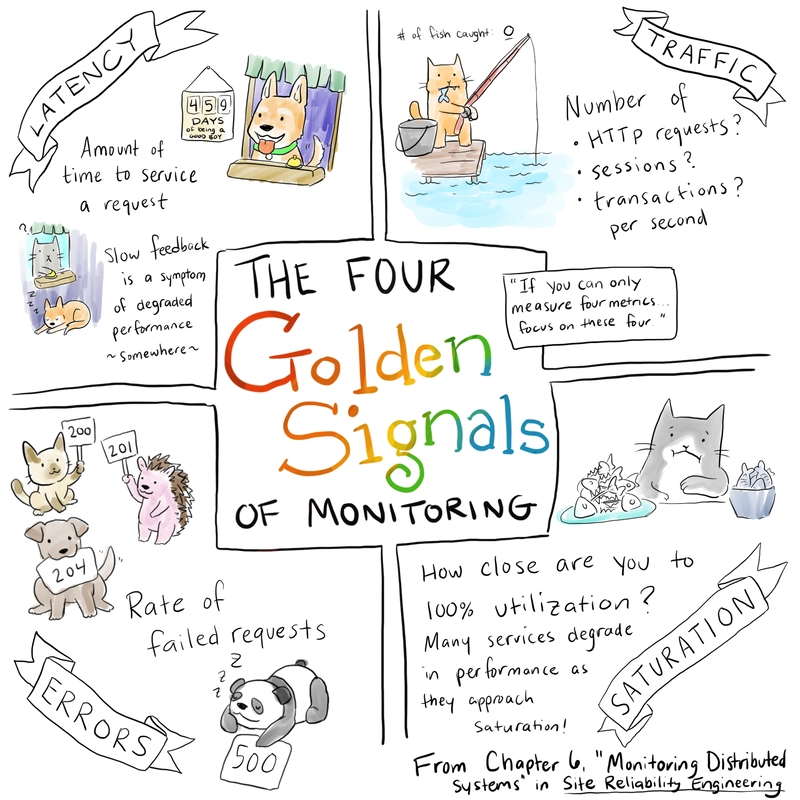
Table of Contents
Introduction
Get Started
Canonical logs
Traces
Metrics
General Best Practices
GitHub demo repo
Conclusion
In this small post, I'll share some resources, notes I've taken while learning, and best practices for making our systems observable. I've always had a knowledge gap regarding observability, and recently I've truly enjoyed learning more about this area in our software industry.
Quick note: In this post I'll only share about 3 telemetry signals. Profile is another signal that I will research in the future.
Follow these steps to get started with auto-instrumentation in your application using OpenTelemetry: https://opentelemetry.io/docs/languages/net/getting-started/#instrumentation
For OpenTelemetry in a front-end app you can check these useful resources:
Grafana faro
Next.js
Guide for OpenTelemetry in Next.js
Browser OpenTelemetry getting started
Client-side instrumentation in OpenTelemetry is part of their roadmap which is great to see, since I've only seen vendor-specific solutions and products for front-end apps (e.g. New Relic, Datadog). For browser instrumentation otel doesn't seem to be super mature yet, but a lot of effort is being put into this area by the OpenTelemetry team.
We all know about logs 😄. It's data that we all need in order to troubleshoot and know what is happening in our applications. We shouldn't overdo it, creating tons and tons of logs since that will probably create noise and make it harder to troubleshoot problems.
For logs, we can use these best practices. From this list, these are an absolute must to follow:
Avoid string interpolation
Use structured logging
Log redaction for sensitive information
In addition to the list above, we should also include the TraceId and SpanId in our log records, to correlate logs with traces. If you are using the Serilog console sink, by default the message template won't have those fields so if you want them, consider using JsonFormatter or CompactJsonFormatter. Here is an example Serilog configuration in appsettings.json (setup to remove unnecessary/noisy logs):
"Serilog": {
"Using": [
"Serilog.Sinks.Console"
],
"MinimumLevel": {
"Default": "Information",
"Override": {
"Microsoft.AspNetCore": "Warning",
"Microsoft.Extensions.Diagnostics.HealthChecks": "Warning"
}
},
"WriteTo": [
{
"Name": "Console",
"Args": {
"formatter": {
"type": "Serilog.Formatting.Json.JsonFormatter, Serilog",
"renderMessage": true
}
}
}
],
"Enrich": [
"FromLogContext",
"WithMachineName",
"WithThreadId",
"WithProcessId",
"WithProcessName",
"WithExceptionDetails",
"WithExceptionStackTraceHash",
"WithEnvironmentName"
],
"Properties": {
"Application": "GrafanaDemoOtelApp"
}
}
Below are some documentation links for logging in .NET. The ILogger extension methods are not always the best choice (e.g. logger.LogInformation), especially in high-performance scenarios or if your logs are in a hot path:
High-performance logging in .NET
Compile-time logging source generation
There is also a different way of logging, based on having more attributes in one single log line. I've seen this in Stripe where they call it canonical log lines. Charity Majors also references this canonical logs term in her blog post about Observability 2.0 (that I reference in the Resources section).
This idea is very interesting, but might lack awareness. At least in .NET land, I didn't find many references to this style of logging or example code that we could follow when there are many ILogger instances involved.
For traces in .NET we have these best practices. So far I've seen four common solutions for adding correlation ids in traces (not all are standards):
W3C trace context - current standard in the HTTP protocol for tracing
X-Correlation-Id - a non-standard HTTP header for RESTful APIs (also known as X-Request-Id). I thought this was a standard since it's widely used, but I didn't find a RFC from IETF or any other organization.
Request-Id - this is a known header in the .NET ecosystem
B3 Zipkin propagation - Zipkin format standard
AWS X-Ray Trace Id - proprietary solution for AWS that adds headers for tracing
Not every company/project uses W3C trace context, you have some options above to pick from. I prefer the standard W3C trace context 😄 (maybe the industry will widely adopt this in the future) and using OpenTelemetry to manage these headers (HTTP, AMQP, etc) and correlation with logs automatically. The code you don't write can't have bugs 😆.
With that said, in some situations, you might have integrations with 3rd party software and need to use their custom headers or project limitations and need to use a particular format. At the end of the day what's important is that you have distributed tracing working E2E.
There is also a relevant spec for distributed tracing called Baggage which OpenTelemetry implements and we can use in our apps. The most important part here is trace propagation to get the full trace from the publisher to the consumer.
For metrics, it's important to follow naming conventions for custom metrics. Especially if your organization has a platform team, setting conventions helps everyone. I do know some otel semantic conventions aren't stable, and that also leads to some nuget packages being pre-release.
But anyhow, set conventions for your team or read and follow OpenTelemetry semantic conventions.
Prometheus best practices related to high cardinality metrics.
When I started trying out custom metrics instrumentation I discovered that OpenTelemetry is not always used (the SDK + OTLP). We have the Prometheus SDK which is mature and widely used. Then for Java there are other solutions like Micrometer and others that integrate very well with Spring. In regards to the Java ecosystem, I read this otel Java benchmarks and this Spring post just because I was interested in knowing what the industry is adopting and why.
There is a ton to be learned with SRE principles and practices. But one in particular was very useful for me and my team: always categorize our custom metrics according to the 4 Golden Signals. Any metric we can't categorize is probably not useful for us.
Image Credit to - Denise Yu
Source of Denise Yu's art.
Google's SRE book is amazing to learn more about the 4 Golden signals and creating SLO-based alerts. All our alerts should be actionable (or the support team will not be happy), so it helps if they are based on SLOs that are defined as a team.
They also have some best practices for production services.
Glossary of many observability terms in case you’re not familiar with them: https://github.com/prathamesh-sonpatki/o11y-wiki
Awesome Observability GitHub repo
If dashboards make you happy check the Grafana observability report dashboard
AWS observability best practices guide
About RED and USE method
Traces Instrumentation best practices in .NET
What are the Limitations of Prometheus Labels?
CNCF OpenTelemetry certification
TAG Observability whitepaper - this is an amazing resource with tons of information! I also recommend checking out the other resources they have in the tag-observability repo and community
Resources specifically about Observability 2.0:
Observability 2.0 by Charity Majors
Re-Redefining Observability
Is It Time To Version Observability? (Signs Point To Yes) - Charity Majors
Talks
How Prometheus Revolutionized Monitoring at SoundCloud - Björn Rabenstein
How to Include Latency in SLO-based Alerting - Björn Rabenstein, Grafana Labs
Myths and Historical Accidents: OpenTelemetry and the Future of Observability Part 1
Modern Platform Engineering: 9 Secrets of Generative Teams - Liz Fong-Jones
Context Propagation makes OpenTelemetry awesome
I've been developing a demo app (it has fewer features than the otel demo) to demonstrate how to build an app with OpenTelemetry, Grafana and Prometheus. It's primarily focused on a small app I can showcase in my talks.
If you're interested take a look:
/
grafana-observability-demo
Observability - Grafana Demo for Talks
This is a simple demo showcasing how we can instrument our applications with OpenTelemetry, using Azure Monitoring + Grafana + Prometheus
It's intended to be used as the demo of a specific talk about observability.
Demo app instructions
Read the instructions in src/README.md.
Session Abstracts
Observability with Azure Managed Grafana
Nowadays, OpenTelemetry is used extensively to collect telemetry data from our applications, and serves as an industry standard. But we need a way to visualize this data in a clear way, and that is where Azure Managed Grafana comes in.
In this session we'll go through the core concepts of observability and demonstrate how we can use Azure Managed Grafana, integrated with Prometheus Grafana Tempo and Loki to gather insights from our telemetry data
We will cover topics such as the basics about logs, metrics and traces, manual instrumentation, OTLP, and others. We'll…
View on GitHub
Hopefully, some of these resources I've shared are useful to you 😄. I still have a ton to learn and explore, but I'm happy with the knowledge I've acquired so far.
There are some specific standards + projects that I'll dive in and explore more, like: eBPF; OpenMetrics. OpenMetrics is something I'd like to spend some quality time reading about, but I know it's archived and reddit says the same. Just want to read and watch some talks about it to feed my curiosity 😃.
Last but not least, I want to follow the work that some industry leaders are doing like Charity Majors, specifically about Observability 2.0 😄. I discovered this term in the Thouthworks tech radar, and the part "high-cardinality event data in a single data store" caught my interest.
I'm still learning, researching, and listening to the opinions of industry leaders about this term to then develop my own opinions. Maybe I'll make a blog post about this in the future 😁.
David Pereira1 year ago
Taking a look at what influenced me as I grow
I've wanted to write down what/who has helped me grow as a developer for quite some time. Well... here it is 😄.
Here is a tweet where I shared talks that I enjoyed a ton, and helped me grow:
// Detect dark theme
var iframe = document.getElementById('tweet-1540783019862024194-83');
if (document.body.className.includes('dark-theme')) {
iframe.src = "https://platform.twitter.com/embed/Tweet.html?id=1540783019862024194&theme=dark"
}
In this post, I'll share my retrospective about what has influenced me. I'll mention a few videos on that tweet that really molded who I am 😄
The person that taught me the most about communication and leadership was Paulo Neto. I'd had the privilege of participating in many group or 1-1 sessions with Paulo, with other colleagues from Create IT.
You don't need to be the Tech Lead to be a leader on your team. Give feedback to your colleagues on what they did great, or what they can improve. This doesn't mean "always give specific instructions on how to get from point A to point B". The strategy we use to give feedback depends on the other person, but sometimes it's just better to ask questions, not give solutions. This challenges the other person to come up with a solution and think critically about the problem.
I used to help by giving all the answers to the problems people asked me. By giving my opinion even if nobody asked for it. If I give away the solution right away, let's say to a junior dev, it means I just stole an opportunity for that person to grow.
When you give feedback, the focus is on the other person's growth, not your own.
I'm still getting better at being a human, but Paulo helped me a lot in being on the right path.
This video really taught me what meant to learn. Re-learning is a part of the process! This completely changed how I look at certain topics.
One more thing that is crucial, is to reserve time to learn! Saying "I don't have time to learn k8s" is the equivalent of saying "Learning k8s is not my priority right now". We have time for everything in this world, it's all a matter of priorities 😂. I've sacrificed my learning/growing time to deliver user stories on the sprint, for several occasions. If you are saying yes to every request someone asks you, it usually ends up with you prioritizing those requests, and not your own time to learn k8s, for example.
Sharing knowledge is a key differentiator for a software developer. Have you ever tried teaching something to your colleagues, then get follow-up questions? Are you able to answer all of them 😅 ?
Teaching helps you discover gaps in your knowledge, and it's something I'm still improving. To feel like an expert in a subject, you need to first explain it to someone that has no knowledge about it. If you try and you fail to get the other person to understand the subject, it means you have work to do. I've used many meetings with colleagues as a means to know if I deeply understand a subject like idempotency, microservices, BFF, CQRS, etc.
Imagine you're onboarding a new teammate and you are the senior dev. Your capability to teach about the codebase, business domain, and other subjects is important. It can be the difference between having a new dev that is productive after one week, instead of one month.
I've talked mostly in this post about my own growth... but that doesn't mean all I need to do is develop my own skills.
the hardest challenge in this industry is making other people more productive! Not just making myself more productive and better at engineering 😅. Some people do this amazingly well, but I'm still growing in this regard 😄
Like Einstein said:
If you can't explain it to a six year old, you don't understand it yourself.
In retrospect, I follow just a few key people. As time passed, I focused on other interesting topics, instead of "simple tutorials" (the amount of content I consume didn't exactly decrease). Here is a list of the people I follow the most nowadays:
ThePrimeTimeagen
Derek Comartin
Scott Hanselman
Dave Farley
One of the videos I loved the most from Scott was this one:
What he shared really resonated with me. I felt powered up inside to keep learning and sharing, perhaps make more blog posts in Portuguese... but I never did that 😅.
Also someone I have learned a ton is Emily Freeman. I absolutely loved this talk she made at GitHub Universe!
Recently I shared another list of more front-end people I follow and recommend:
David Pereira
•
May 7 '23
I'd add some people to that list:
Kent C. Dodds
Dan Abramov
Theo
Guillermo Rauch
They have either awesome blogs or videos that you can learn a lot from!
I'd also recommend to follow and learn from Kelsey Hightower, for example this video. It's not particular about front end, but you can learn many valuable lessons from him :)
I'm way more confident now, and all those people I mentioned made and shared content that helped me grow.
If you're interested in AsyncAPI and CloudEvents, take a look at my post:
Getting Started with CloudEvents and AsyncAPI
David Pereira ・ Sep 16 '21
#eventdriven
#cloudevents
#asyncapi
#architecture
David Pereira3 years ago

How to use the SEO meta tag rules module for Page Designer in SFCC
Table of contents
Introduction
The problem
The solution
Alternative solutions to SEO meta tag rules
Conclusion
Additional Links
We have a great feature available to us in Salesforce Commerce Cloud (SFCC) called SEO meta tag rules. This is a module inside of SEO in Business Manager (BM).
only support for PDP/PLP pages made in page designer that support these meta tag rules.
In this blog post we'll see how to support SEO meta tag rules for all pages made in page designer.
Before going any further, I want to mention some disclaimers. At the time of writing this, not all pages in page designer support this. This could be added to SFCC and be directly supported without custom development. I posted this idea as a feature enhancement for Salesforce in IdeaExchange.
With that said, let's take a step back and understand the problem.
The SEO experts on a business operate mostly on the SEO meta tag rules BM module. If they need more granular level of SEO customization, most System Objects (e.g. Products, Content Assets, Categories) of SFCC support SEO fields like pageUrl, pageTitle, pageDescription. SEO experts can define rules that act as fallbacks, and then if some merchants don't define these fields for particular categories or pieces of content. You still have some meta tags being added to the page by these rules.
Now, even though this feature supports many types of pages, like home page, product pages or product listing pages. It doesn't support all types of Page Designer (PD) pages.
Page class, and check that it doesn't have the pageMetaTags field like the Content class does.
Page Designer pages are very similar to Content Assets, in the sense that underneath, these pages are persisted as the same content objects on the SFCC's database. But there are still differences, the support for meta tag rules feature is one of them.
Ultimately, these differences makes it harder for merchants or SEO experts that want to leverage the same functionality available on the rest of the site.
Now that you have a better understanding about the problem, let's shift our focus into a solution.
The whole premise of this solution is that it's supported by the SEO meta tag rules module of BM. In this module we have support for the following:
Homepage
Product pages
Content Detail pages
Content Listing pages
The only one that fits well with a page designer page is Content Detail page. Meaning we'll create content assets as a way to support these SEO rules for Page Designer.
Page.js you can get the meta tags for that page, through that content asset. Here is an example of the Page-Show extension:
server.prepend("Show", function (req, res, next) {
var PageMgr = require('dw/experience/PageMgr')
var ContentModel = require('*/cartridge/models/content')
var pageMetaHelper = require("*/cartridge/scripts/helpers/pageMetaHelper")
var page = PageMgr.getPage(req.querystring.cid);
if (page != null && page.isVisible()) {
var pageContent = ContentMgr.getContent(page.ID + "-seo")
if (pageContent) {
var content = new ContentModel(pageContent, "content/content")
pageMetaHelper.setPageMetaData(req.pageMetaData, content)
pageMetaHelper.setPageMetaTags(req.pageMetaData, content)
}
}
next()
})
Now you don't need to create a content asset for every since page from PD. For example, if you business doesn't use the syntax ${Content.pageTitle} in your meta tag rules, or any expression regarding the object Content. Then in that case you could simply create one content asset for each folder the business wants to have.
Folders are the way you can group multiple pages, and make all of them inherit the same meta tag rules. Once a folder is created, the business can use it in the SEO meta tag rules module inside BM.
So far the solution revolves around the business creating manually folders, assigning them to pages and creating content assets for every page (in case they want to leverage page properties) or every folder.
This is a critical step, since having all this manual work doesn't make sense for business people. As engineers we can do better and automate the creation of these content assets. We can develop two different pieces that play together:
a job to ensure every page from Page Designer, has it's associated content asset and all the rest
a new BM module to automate folder creation, specifically creating multiple folders
Let's go through the job first, its responsible to update the content assets associated with each page. This means creating that content asset if it doesn't already exist, and then assign it to the same folders as the page. To implement this job you need:
Get the list of all Page Designer pages
Iterate through all pages
For each page, create the content asset and assign the appropriate folders
Here is a code snippet (in ES6) representing a possible implementation:
const libraryGateway = require("*/cartridge/scripts/gateways/libraryGateway")
const pagesList = getAllPageDesignerPages()
pagesList.forEach(page => {
const contentId = `${page.ID}-seo`
const result = libraryGateway.createContentAsset({
id: contentId,
pageTitle: page.pageTitle
})
if (result.error) {
throw new Error("Error creating content asset")
}
page.folders.forEach(folder => {
const result = libraryGateway.assignContentAssetToFolder(contentId, folder.ID)
})
})
function getAllPageDesignerPages() {
const ContentSearchModel = require("dw/content/ContentSearchModel")
const apiContentSearchModel = new ContentSearchModel()
const libraryID = "someId"
apiContentSearchModel.setRecursiveFolderSearch(true)
apiContentSearchModel.setFilteredByFolder(false)
apiContentSearchModel.setFolderID(libraryID)
apiContentSearchModel.search()
const contentSearchResultIterator = apiContentSearchModel.getContent()
const count = Number(apiContentSearchModel.getCount())
const pages = []
if (contentSearchResultIterator && count > 0) {
while (contentSearchResultIterator.hasNext()) {
const contentResult = contentSearchResultIterator.next()
if (contentResult?.page) {
// transform some contentResult fields to other types...
pages.push(contentResult)
}
}
}
return pages
}
In the implementation above, getting all pages from Page Designer is done through the ContentSearchModel API. Although this works, it's not ideal in my opinion since these pages are required to be searchable (a setting on all pages) and online. If they aren't, then they won't be on the Content index, which seems to be the only way to get all page designer pages on a given site.
libraryGateway module. To implement this module we need to use OCAPI.
We can use OCAPI Data APIs to create content assets/folders and assign content assets to folders. While researching I tried finding another way, but I didn't find anything easier. The Salesforce Commerce API (dw library accessible server-side) doesn't seem to have APIs for these operations. I didn't find any pipelets or jobs steps that do this either... perhaps by exporting the content library, then creating a custom job that reads that file, edits it with the new content objects, and finally runs a job step to import that edited file.
Interacting with OCAPI is not an expensive development effort, so you can develop a custom cartridge for this. We won't go through the details about that cartridge, perhaps on a separate blog post :slight_smile:
All the operations we want to do can be found on the Libraries resource from the Data API. To create a content asset we can use this endpoint, to assign it to a folder we can use this endpoint. One thing to keep in mind, creating a content asset is an idempotent operation. This means it creates the object if it doesn't already exist, but if it does it ignores the existing object and writes a new one on top.
In practice, this means if someone edits these content assets (e.g. through BM, locking the resource and updating the description field), that modification will be lost.
Now let's discuss the custom BM module to create folders. If business people want to create multiple filters in one go, instead of doing it through the BM UI and then going to Page Designer to assign pages to folders, they input the filter names in an input box and click a button. We can simply develop a web page that has this input box and a button (and some instructions on how to use it). This is possible by extending BM and building a custom cartridge, with this UI and the controller that executes the creation of folders.
We won't go to much into detail about this custom cartridge, I've added additional links at the bottom to help you building this cartridge.
In the case where the content object quotas are hit, we can consider building something entirely custom. What I mean is we would not use the SEO meta tag rules module from BM anymore. We would build our piece of software to handle this scenario - all page designer page types. Of course that means building software that does the same as Salesforce's built-in module of BM, considering:
Storage to store these rules, meta tag definitions, and others
An API that at least exposes a way to get meta tags for a given page, taking into account API design, SLA (important if you'll call this in a middleware of the Page.js controller), etc
This is a discussion you must have with your business/client, explaining the trade-offs of each scenario.
In my opinion, it's generally often better to reuse existing functionality or an off-the-shelf solution like a plugin cartridge.
can't extend this module. So if we really needed to support this feature and we hit the API quotas of the SFCC platform, we would consider building a cost-effective solution outside SFCC, considering the need of a custom parser for if statements, context variables... again a discussion to be made with the business and architects.
One important note about this solution is that pages would only inherit meta tags assigned to the default folder (primary folder). From my research, a content asset can only have one default folder, and that is the folder the meta tags come from.
hierarchy (primary folder, then parent folders, up to root), but it's not the exact behavior I needed.
In conclusion, you can develop a custom cartridge with this functionality, and support this for your business or clients. In the future, this might be supported out of the box by SFCC. The greatest challenges were: analyzing ways to extend the SEO meta tag rules module; an API to get all page designer pages and understanding the limitations of our solution.
Let us know in the comments if this feature is something you'd like to have, or vote and comment on the IdeaExchange's post. I hope this has been helpful 👍.
Check out my other blog post on session management for SFCC.
Here are some links to documentation and other resources, that you may find useful if you're interested in building this feature for your business:
IdeaExchange's post
How to get a list of pages of Page Designer using code?
OCAPI Data Libraries resource
Configuring the Business Manager Site
David Pereira3 years ago